Car Diagnostic Tools: Complete Guide
Car Diagnostic Tools: Types, Functions, and How to Choose the Right One
Modern vehicles rely heavily on electronic control units (ECUs) to monitor and control engine operation, transmission, braking, safety systems, emissions, and other vehicle functions. When a fault is detected, the vehicle can store diagnostic information that a scan tool can access.
A car diagnostic tool is therefore much more than a device that turns off the Check Engine Light. Depending on its design and software, it can read diagnostic trouble codes, display live data, scan multiple control modules, perform active tests, and carry out specific service functions.
But diagnostic tools vary enormously in capability. A basic OBD2 scanner and a professional workshop scan tool are not interchangeable.
This guide explains the main types of car diagnostic tools, what they can do, and what to look for when choosing one.
What Is a Car Diagnostic Tool?
A car diagnostic tool, also called a diagnostic scanner or scan tool, is a device that communicates with a vehicle’s electronic control modules.
The tool connects to the vehicle through its diagnostic interface, commonly the OBD connector on compatible vehicles. It retrieves information from the vehicle and presents it to the technician or vehicle owner.
OBD systems monitor certain vehicle systems and can store Diagnostic Trouble Codes (DTCs) when a malfunction is detected.
The important point is that a diagnostic tool provides diagnostic information. It does not automatically determine which component should be replaced.
Types of Car Diagnostic Tools
Not every diagnostic tool is designed for the same job. The main differences are system coverage, diagnostic functions, vehicle coverage, and software capabilities.
1. Basic OBD2 Scanners
Basic OBD2 scanners are designed primarily for straightforward engine and emissions diagnostics.
Typical functions include:
- Reading diagnostic trouble codes
- Clearing fault codes
- Viewing basic live data
- Checking emissions-related information
- Checking readiness monitors
- Reading freeze-frame information on supported vehicles
These tools are useful when the main concern is a Check Engine Light or an engine/emissions-related fault.
However, a basic OBD2 scanner may not have access to systems such as ABS, airbags, transmission, or body control modules.
Who is it for?
A basic OBD2 scanner can be suitable for:
- Vehicle owners
- DIY users
- Drivers who want basic fault-code information
- Simple engine diagnostics
2. Bluetooth OBD2 Adapters
Bluetooth OBD2 adapters are small devices that plug into the vehicle’s diagnostic connector and communicate with a smartphone, tablet, or computer.
Instead of having its own screen, the adapter relies on compatible diagnostic software or an application.
Depending on the adapter and software, you may be able to access:
- Fault codes
- Live sensor data
- Vehicle information
- Performance data
- Basic diagnostic functions
The important distinction is that the adapter itself does not determine the software’s capabilities. The application, vehicle, communication protocols, and available functions all matter.
Bluetooth adapters can be convenient for people who want a compact and relatively inexpensive diagnostic setup.
3. Professional Diagnostic Scanners
Professional diagnostic scanners are designed for technicians and workshops that need much broader vehicle and system coverage.
Depending on the platform, professional tools can provide:
- Full-system scanning
- Advanced live data
- Bi-directional controls
- Active tests
- Service functions
- Resets and relearns
- Coding and adaptations
- ECU information
- Special functions
- Vehicle-specific diagnostic procedures
For example, professional diagnostic platforms can support scanning, live-data access, and bi-directional functions across a broader range of systems and vehicles.
The exact capabilities vary by manufacturer, software version, vehicle, and subscription.
4. Manufacturer-Specific Diagnostic Tools
Some diagnostic tools are designed specifically around one vehicle manufacturer or vehicle group.
These tools can provide deeper access to manufacturer-specific systems and functions than a generic scanner.
They may be used for tasks such as:
- Advanced module diagnostics
- Coding
- Programming
- Adaptations
- Manufacturer-specific service procedures
- ECU configuration
For a workshop specializing in one brand, this type of equipment can make sense.
For a workshop working on many different manufacturers, broader multi-brand coverage may be more practical.
5. PC-Based Diagnostic Systems
PC-based diagnostic systems use a computer as the main interface.
A vehicle communication interface connects the computer to the vehicle, while diagnostic software provides access to the vehicle’s systems.
These setups can offer:
- Large-screen diagnostics
- Detailed live data
- Wiring and technical information integration
- Advanced testing
- Manufacturer-specific software
- Diagnostic reports
They are particularly useful in professional environments where technicians need to combine scan data with technical documentation.
What Can a Car Diagnostic Tool Do?
The capabilities depend on the tool, but modern diagnostic equipment can provide much more than basic code reading.
Read Diagnostic Trouble Codes
The most familiar function is reading DTCs.
A vehicle can store a code when its monitoring system detects a fault condition. The diagnostic tool retrieves that information and displays it.
Codes can help identify the system or condition associated with the fault.
However:
A trouble code is a starting point for diagnosis, not automatically a failed part.
For example, a fault code associated with an oxygen sensor does not necessarily mean the oxygen sensor itself is defective. Wiring, connectors, power supply, exhaust leaks, or another underlying problem could be involved.
Clear Diagnostic Trouble Codes
Most scanners can erase stored fault codes.
This can be useful after a repair to confirm whether the fault returns.
However, clearing a code does not repair the problem. If the underlying fault remains, the code or warning light may return.
OBD systems can also store information about the operating conditions under which a fault was detected, which is why simply clearing codes can remove useful diagnostic information.
View Live Data
Live data allows the technician to observe values reported by sensors and control modules while the vehicle is operating.
Depending on the vehicle and tool, this can include:
- Engine RPM
- Coolant temperature
- Intake air temperature
- Throttle position
- Airflow
- Oxygen sensor data
- Fuel trims
- Vehicle speed
- Battery voltage
- Pressure readings
Live data becomes particularly useful when diagnosing faults that do not provide enough information from the DTC alone.
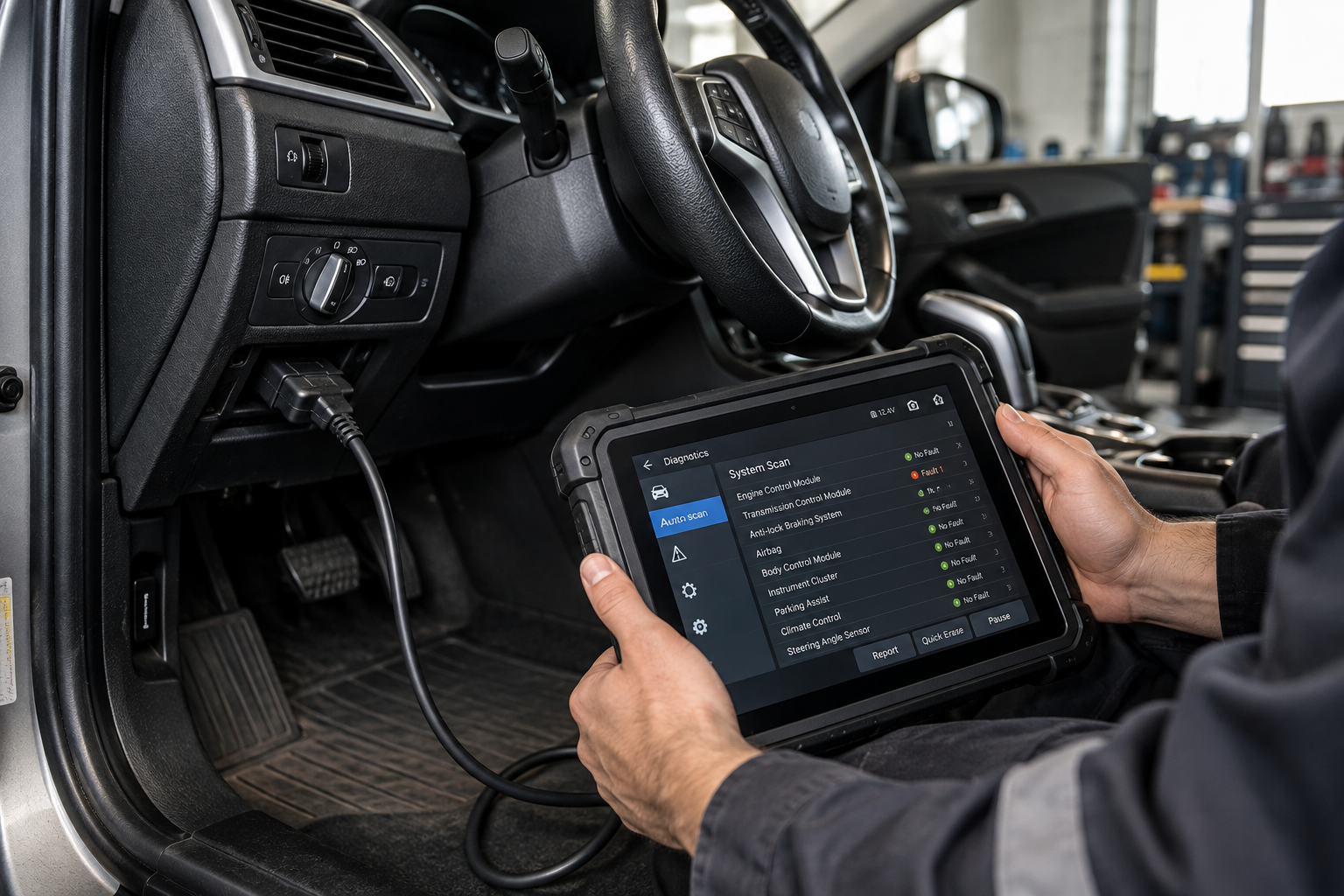
Perform a Full-System Scan
Advanced diagnostic tools can scan multiple control modules instead of looking only at the engine ECU.
Depending on the vehicle, this may include:
- Engine
- Transmission
- ABS
- SRS/airbag
- Body control
- Steering
- HVAC
- Instrument cluster
- Parking brake
- TPMS
- ADAS-related systems
This can reveal faults that a basic engine-only scanner would not see.
Perform Active Tests
Some professional diagnostic tools support active tests, also called bi-directional controls.
Instead of simply reading information from the vehicle, the tool can send commands to supported modules or components and observe the response.
Depending on the vehicle, examples may include commanding certain:
- Relays
- Solenoids
- Fans
- Pumps
- Actuators
- Valves
This can help technicians determine whether a component or circuit responds correctly.
Not every tool supports active testing, and the available tests are vehicle-specific.
Perform Service Functions
Advanced scanners may also support maintenance and service-related functions.
Examples can include:
- Oil service reset
- Electronic parking brake service
- Battery registration
- Steering-angle calibration
- Throttle relearn
- DPF-related functions
- Injector-related procedures
- Transmission adaptations
The availability of these functions depends on the diagnostic tool and the specific vehicle.
Basic OBD2 Scanner vs Professional Diagnostic Tool
| Feature | Basic OBD2 Scanner | Professional Diagnostic Tool |
|---|---|---|
| Engine DTCs | ✓ | ✓ |
| Clear DTCs | ✓ | ✓ |
| Basic live data | ✓ | ✓ |
| Readiness monitors | ✓ | ✓ |
| Full-system scan | Limited/No | ✓ |
| ABS diagnostics | Usually limited | Often ✓ |
| SRS/Airbag diagnostics | Usually limited | Often ✓ |
| Advanced live data | Limited | ✓ |
| Active tests | Usually No | Often ✓ |
| Service functions | Limited | ✓ |
| Coding/adaptations | Usually No | Some tools ✓ |
| Manufacturer-specific functions | Limited | Much broader |
Important: “Professional” does not mean every function works on every vehicle. Always check the tool’s actual coverage before purchasing.
How to Choose the Right Car Diagnostic Tool
The right diagnostic tool depends on what you need to diagnose, not simply how many features the manufacturer lists.
1. Check Vehicle Coverage
This should be one of your first checks.
A tool may support many manufacturers but have different levels of functionality for each one.
Check:
- Make
- Model
- Year
- Engine
- Region
- Supported control modules
- Supported special functions
Don’t assume that a feature available on one vehicle is automatically available on another.
2. Decide Which Systems You Need
Ask yourself what you actually need to access.
If you only need engine diagnostics, an OBD2 scanner may be enough.
If you regularly diagnose:
- ABS
- Transmission
- SRS
- Body modules
- Steering
- HVAC
- Parking brake
then you’ll need a tool with broader system coverage.
3. Look at the Diagnostic Functions
Two scanners can both advertise “full diagnostics” while offering very different capabilities.
Check specifically for the functions you need:
Code reading → Live data → Active tests → Service functions → Coding → Adaptations → Programming
Don’t choose based on the number of functions alone.
4. Check Software Updates
Modern vehicles continue to receive new models, systems, and diagnostic requirements.
Software updates can therefore be an important part of a professional diagnostic platform.
Before buying, check:
- How often updates are released
- How long updates are included
- Whether updates require a subscription
- What happens when the subscription expires
- Whether updates add vehicle coverage or functions
Some professional diagnostic platforms use subscription-based software models, so the purchase price is not necessarily the total cost of ownership.
5. Consider Hardware
For professional use, hardware matters too.
Look at:
- Screen size
- Battery life
- Cable quality
- Wireless connectivity
- Durability
- Charging speed
- Storage
- Processing performance
- Camera, if required
- Vehicle communication interfaces
A tool that is used throughout the day needs to be practical and reliable, not just feature-rich.
6. Consider Technical Support
Advanced diagnostics can become complicated.
Good technical support can be valuable when dealing with:
- Vehicle coverage questions
- Software issues
- Diagnostic procedures
- Updates
- Security access
- Special functions
For professional workshops, support should be considered alongside the tool’s hardware and software.
Common Mistakes When Buying a Diagnostic Tool
Choosing the Cheapest Scanner
A cheap scanner isn’t necessarily a bad scanner.
The problem is buying one that doesn’t support the systems you actually need.
If you work on ABS, SRS, transmission, and body modules, a basic engine scanner may quickly become inadequate.
Assuming “Full System” Means Everything
Marketing terminology can be misleading.
Always verify exactly what full system, bi-directional, coding, or programming means for the vehicles you work on.
Ignoring Subscription Costs
A diagnostic tool may look affordable initially but become significantly more expensive when software updates or additional services are included.
Calculate the total cost over several years, not only the purchase price.
Buying Based Only on the Number of Functions
More functions don’t automatically mean a better tool for your situation.
A tool with 40 functions that supports your vehicles properly can be more useful than a tool advertising hundreds of functions with limited coverage for your vehicles.
Do You Need a Professional Diagnostic Tool?
It depends on your work.
For a car owner
A basic OBD2 scanner can be useful for checking engine-related faults and understanding a Check Engine Light.
For a DIY mechanic
A mid-range scanner with broader system access can provide considerably more useful information.
For an automotive technician
Full-system diagnostics, live data, active tests, and service functions can become important parts of the diagnostic workflow.
For a professional workshop
Vehicle coverage, advanced functions, software updates, technical information, and support should all be considered before investing in a diagnostic platform.
What a Diagnostic Tool Cannot Do
Even an expensive professional scanner cannot replace proper diagnostic testing.
A scan tool may tell you that a system has detected a fault, but the actual cause could be:
- A failed component
- Damaged wiring
- Poor electrical connection
- Low battery voltage
- Grounding problem
- Mechanical failure
- Software issue
- Communication problem
Some problems may not generate a useful DTC at all.
For this reason, professional diagnosis often combines scan tools with multimeters, oscilloscopes, pressure testers, smoke machines, and other testing equipment.
The scan tool tells you where to investigate. Testing helps determine why the fault occurred.